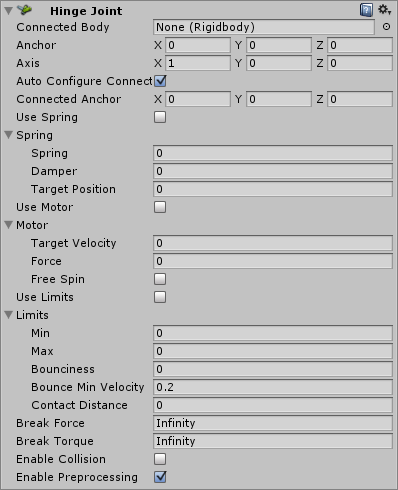
The Hinge Joint groups together two Rigidbodies , constraining them to move like they are connected by a hinge. It is perfect for doors, but can also be used to model chains, pendulums, etc.
Properties
Property:
Function:
Connected Body
Optional reference to the Rigidbody that the joint is dependent upon. If not set, the joint connects to the world.
Anchor
The position of the axis around which the body swings. The position is defined in local space.
Axis
The direction of the axis around which the body swings. The direction is defined in local space.
Auto Configure Connected Anchor
If this is enabled, then the Connected Anchor position will be calculated automatically to match the global position of the anchor property. This is the default behavior. If this is disabled, you can configure the position of the connected anchor manually.
Connected Anchor
Manual configuration of the connected anchor position.
Use Spring
Spring makes the Rigidbody reach for a specific angle compared to its connected body.
Spring
Properties of the Spring that are used if Use Spring is enabled.
Spring
The force the object asserts to move into the position.
Damper
The higher this value, the more the object will slow down.
Target Position
Target angle of the spring. The spring pulls towards this angle measured in degrees.
Use Motor
The motor makes the object spin around.
Motor
Properties of the Motor that are used if Use Motor is enabled.
Target Velocity
The speed the object tries to attain.
Force
The force applied in order to attain the speed.
Free Spin
If enabled, the motor is never used to brake the spinning, only accelerate it.
Use Limits
If enabled, the angle of the hinge will be restricted within the Min & Max values.
Limits
Properties of the Limits that are used if Use Limits is enabled.
Min
The lowest angle the rotation can go.
Max
The highest angle the rotation can go.
Bounciness
How much the object bounces when it hits the minimum or maximum stop limit.
Contact Distance
Within the contact distance from the limit contacts will persist in order to avoid jitter.
Break Force
The force that needs to be applied for this joint to break.
Break Torque
The torque that needs to be applied for this joint to break.
Enable Collision
When checked, this enables collisions between bodies connected with a joint.
Enable Preprocessing
Disabling preprocessing helps to stabilize impossible-to-fulfil configurations.
Details
A single Hinge Joint should be applied to a GameObject . The hinge will rotate at the point specified by the Anchor property, moving around the specified Axis property. You do not need to assign a GameObject to the joint’s Connected Body property. You should only assign a GameObject to the Connected Body property if you want the joint’s Transform to be dependent on the attached object’s Transform.
Think about how the hinge of a door works. The Axis in this case is up, positive along the Y axis. The Anchor is placed somewhere at the intersection between door and wall. You would not need to assign the wall to the Connected Body, because the joint will be connected to the world by default.
Now think about a doggy door hinge. The doggy door’s Axis would be sideways, positive along the relative X axis. The main door should be assigned as the Connected Body, so the doggy door’s hinge is dependent on the main door’s Rigidbody.
Chains
Multiple Hinge Joints can also be strung together to create a chain. Add a joint to each link in the chain, and attach the next link as the Connected Body.
Hints
You do not need to assign a Connected Body to your joint for it to work.
Use Break Force in order to make dynamic damage systems. You can use this to allow the player to damage the environment (for example, break a door off its hinges by blasting it with a rocket launcher or running into it with a car).
The Spring, Motor, and Limits properties allow you to fine-tune your joint’s behaviors.
Use of Spring, Motor are intended to be mutually exclusive. Using both at the same time leads to unpredictable results.
turn light on or off in unity
How to Animate a Character from Mixamo in Unity - Full Walkthrough
simple car controller in unity
để cài đặt 2D animation cho unity ta vào Unity vào development tool
dowload unity hub. reooif cài đặt Animation 2D 2020,
vào menu Windows -> Packed manager-> tab All Packed -> chọn các
2D IK, 2D Pixel Perfect, 2D PSDImporter
quá trình cài rất nhanh
mở Sprite Editor nơi chứa các ảnh của các bộ phận rời nhau
bone Visualbility :
TorsoDepth 6
Jacket_Right 7
Jacket_Left 2
Shoulder_Right 9
Arm_Right 8
Hand_Right 9
ShoulderLeft 1
Arm_Left 0
Hand_Left 1
Chest 3
Hips 7
Tail 1
Head 4
Lower 0
Thigh_Right(đùi phải) 8
Leg_Right 7
Food_Right 8
Thigh_Left(đùi trái) 4
Leg_Left 3
Food_Left 4
video tham khảo tại đây
+ Chuyển sang tab Rivert bên trái trình soạn thảo khi xem xương gắn đúng phân cấp rồi ấn vao tab Auto Geometry .
+ ấn vào Button Generated For Selected cuối cùng góc bên phải dưới , mọi thứ xem có đúng không , có thể hiệu chỉnh các điểm ảnh 1 chút tại đây , xong ròi thì ấn Tab Apply phần trên cùng phía phải của cửa sổ Sprite Editor
Ta kéo hình chứa các bộ phận của con cáo vào Scene lưu ý ở dưới Assets có thể có nhiều hình các bộ phận của con cáo rồi nhau ở từng các sprite khác nhau nhưng sprite chứa các bộ phận con cáo được kéo vào ở đây được đặt chung trên 1 sprite (có nghĩa hình được ké vào chỉ gồm 1 ảnh , trên ảnh đó có các ảnh nhỏ
ta có sprite mode : Single
pixel per unit : 100 sửa thành 300 => Apply
Đang chọn FoxSpriteSheet -> Add Component ->Sprite Skin
Nhấn Button đầu tiên Creat Bone
Tab Gizmos Đang được chọn ta có thể kiểm tra tác dộng của xương đến phần bộ phận cơ thể con cáo
trên Scene bây giờ gồm các đối tượng sau : các đối tượng dưới nằm trong đối tương FoxSpriteSheet
FoxSpriteSheet
Torso
ShouldLeft
Chest
Hips
Head
Lower
Dùng sẵn nhân vật Third Player Controler để di chuyển trong scene và sau đó ta có thể thay bằng nhân vật khác nếu muốn